top of page

The challenge
95% of car shoppers start their buying journey online.
Dealerships want to drive that traffic to their website, and turn shoppers into leads and sales. Driving traffic with effective ads is hard to do at scale in a very competitive automotive market.
The Solution
A tool that creates Google and Facebook at ads at scale using AI and machine learning.
I was responsible for all aspects of the UX/UI from research and definition to visual designs and adding feature improvements.

The hypotheses
If we create a tool that can create Google and Facebook ads at scale using machine learning, it can help dealerships improve their marketing and win sales by allowing them to focus on strategy and less on the small details.

Planning & Research

I started by talking to our customer success team, sales and biz dev because they were the ones internally who had daily contact with our industry partners and clients. They converse often about issues and challenges, and what the customer's needs are. This allowed me to build out personas and better define our customers' challenges and create user stories.


The right answers need the right questions
-
What does the structure of the marketing department in the dealership look like?
-
Who currently does dealership marketing?
-
How is this done today? What is their process?
-
What challenges do they face day to day?
-
What are their concerns regarding creating ads?
Personas
To better understand the personas and answer the questions above, I spoke to a few of our clients to hear in their own words the challenges and concerns they have day to day.
.png)
.png)
.png)
Current user flow
I mapped out the current process in which dealerships build their ads. It's time consuming, detail heavy and requires an employee to do only this full time, and its very difficult to do at scale. So many dealerships will turn to an agency to do it for them, but dealers feel there is a lack of transparency
Maybe there's a better way to do this? How can tech and innovation make a difference in a really outdated industry?
Dealership goals & objectives
The ads the system needed to create had to be aligned with shopper intents as well as the platform which they would be promoted on. This required education on how ads were built as well as what dealers wanted know about each ad channel.
Sell New Cars
Sell Used Cars
Promote their service center
Search Ads

Display Ads

Social Ads
New Sales objectives targets shoppers looking to buy or lease a new vehicle
.png)
Service objectives targets shoppers looking to service their vehicles

Taxonomy and Content

I mapped out the entire system based on the needs and challenges of the personas. The main categories were: My campaigns split into channels(as per Google ads, and Facebook), editing campaigns and creating new ones. The focus was on building a system that allowed the user to easily create and monitor their digital ads.
User Flow and Designs


Product Validation
The first step in validating the proof-of-concept was to build out a prototype using Invision and test/get feedback from our clients and partners. The onboarding flow allows users to find their store, set up their budget and goals and view the ads the system has created for them. The wizard technique helps to not overwhelm the user.
Initial feedback and testing
The initial reaction to the prototype was positive, there wasn't really anything else like it on the market, and dealers were excited. However, dealers felt that the system was too "high-touch" and they connected with a version that allowed for more monitoring and less hands on. I built out a new user flow that addressed their concerns.

Power users
After test > iterate > repeat, we understood that for most of our users, dealership employees like Lucy, a plug and play system was enough. They needed check in calls every month or so to discuss performance, and receive email reports a bit more frequently and were quite happy with the results of the system. But then, we discovered power users.
Power users are more tech savvy, hands on and in the nitty gritty.
Lets call him, Sean.
80%
Loved the system as it is, made minor adjustments
20%
Power users who wanted to be more involved with the AI
.png)
Internet Director | Power user
Sean
Responsible for everything internet related at Bloomington Autogroup
Needs the ability to adjust the templates the ads are based of: Copy, imagery etc
Critical to know metrics such as CPL, Clicks, Impressions, rather than just sales and leads
Wants to see what ads are being shown to shoppers, and have the ability to change them.
The dashboard
The dealer will set up their ad budget, select which ad channel they want to promote ads on, and which objects are important to them. They can then see all the ads that system built for them, split into Google's micro moments best practices. The visual feedback was that it needed to feel more tech and automotive, so the design system was updated with new fonts, colors and visual language.

The ads manager is where users can go to see what they ads the system has created, look like. There may be 100s of ads all together, but allowing users to view them promotes transparency and trust.

Due to user behavior, and best practices the three channels(Search, display and social) were split into three sections within the dashboard so dealers can focus on the KPIs important to them within each section.
Templates and editing
All ads created in the system are based on templates. One template can create thousands of ads that appeal to different shopper intents, vehicles and even offer types. Templates can also be changed and a/b tested. Power users can adapt and test their own copy against the systems to see which perform better.
1 Give dealers full transparency into how our system works to build their ads.
2 Allow power user to edit ad templates and let them feel in control of their digital advertising.
3 Even standard users of the system may want to change a headline or two, now and then.
.png)

The ad example allows dealers to see what an ad from this objective/ad group would look like. Dynamic content is highlighted in grey.
Splitting the information between tabs helped keep the page clean and allow users to focus on data vs actionable items
Dealers can see how well an ad template is performing and decide if they want to edit it and test performance.
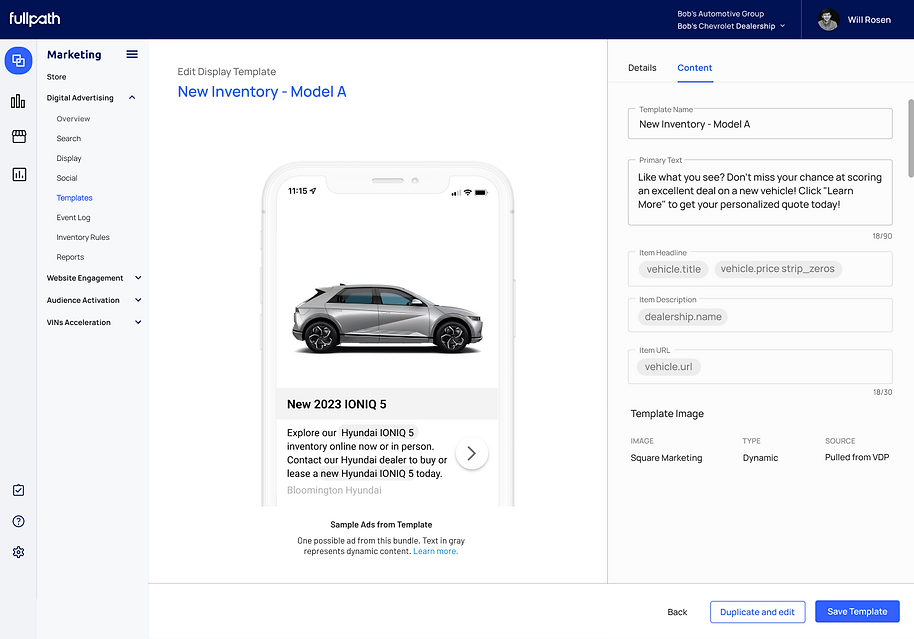
Dealers who need templates to have specific copy, can edit if needed.
Power users loved the control templates provided, but wanted to test their own against the systems. So I added a 'duplicate and edit button to allow users to test their ads against the system's.

Powerful reporting
The main value proposition of the product is that its a powerful machine learning system that can build out your digital advertising at scale. It's a plug and play system, that allows for minor adjustments when needed. This means that the main focus of the dashboard was to support reporting and communicate the ROI to our customers.

Shopper Page
Clicking on a shopper name (see screenshot above) takes users to the shopper/lead page where users can see exactly when they have clicked on an ad, and even which ad they saw and what subsequent actions were taken within the platform.


Design system
The design system was created in collaboration between the product design team and marketing, to reflect our new branding.


.png)
bottom of page